Low-Cost, Full-Feature, Enterprise-Grade Load Balancing for Omnissa Unified Access Gateway – Horizon Edge Services (inclusive UDP)

Introduction
Over the past years working as a datacenter and EUC specialist—particularly in the field of Omnissa Horizon and Workspace ONE—one recurring challenge has been ensuring high availability for the Unified Access Gateway (UAG). While enterprise-grade load balancers provide robust solutions, many organizations, especially small and mid-sized ones, lack the budget or resources to implement them. As a result, they often fall back on built-in UAG high availability features of UAG or open-source technologies such as HAProxy. These solutions work, but they come with limitations: restricted feature sets, limited redundancy options, and above all, the absence of reliable UDP load balancing.
This is particularly significant because UDP load balancing can deliver a substantial performance boost in Horizon environments. Yet, due to its complexity, it is often only partially implemented—or not implemented at all. The lack of UDP support, the need for multiple public IP addresses, and other caveats frequently leave environments operating below their potential.
This article demonstrates how to build a low-cost, full-featured, high-performance load balancing solution (including UDP) for Omnissa Unified Access Gateway—covering Horizon, reverse proxy, and content use cases. The solution is characterized by the following key properties:
- Based on any Linux distribution of choice
- Uses ipvsadm in combination with keepalived to provide robust, kernel-level Layer-4 load balancing with integrated redundancy
- Runs in Direct Routing (DR) mode for maximum throughput and minimal overhead
- Provides full-featured Horizon UDP tunneling support (including seamless operation after failover)
- Supports additional redundancy for the load balancer engine itself (via keepalived/VRRP)
- Operates with a single public IP address
- Achieves extremely fast failover times
To simplify this process, a script is provided at the end of this article that can automatically re-apply the required DR-mode changes inside the UAG after every redeployment, ensuring the load balancer remains fully functional without manual reconfiguration.
In DR mode, the Virtual IP (VIP) must also be configured on the backend UAGs. Without additional adjustments, the UAGs would answer ARP requests for the VIP, which can confuse upstream switches/routers and result in conflicts and unstable traffic flow.
Background & Challenges
In the field of Omnissa Horizon deployments, several approaches exist for small and mid size companies to provide high availability for Unified Access Gateways (UAGs), yet each of them comes with significant limitations that affect performance, cost, or protocol support.
Unified Access Gateway Built-In High Availability
What it is (in practice). UAG’s built-in HA assigns a floating Virtual IP (VIP) to a primary node and automatically moves it to a backup node on failure. It’s simple to enable and is commonly deployed in the DMZ for Horizon/Workspace ONE access.
What it actually covers for Horizon. The built-in HA/VIP primarily protects the primary Horizon control leg (XML-API over HTTPS/TCP 443). After login, Horizon launches secondary protocols (HTTPS Tunnel, Blast TCP/UDP, PCoIP TCP/UDP) that must hit the same UAG as the primary leg; otherwise the session is rejected. Native HA does not load-balance UDP session traffic, so you still need an affinity strategy.
Affinity/topology options you can use (three scenarios). Omnissa describes multiple ways to guarantee that secondary protocols land on the same UAG as the primary—choose based on your constraints:
- Source-IP Affinity (single VIP/FQDN, external LB) An external load balancer uses client IP stickiness so all flows from a client go to the same UAG. Simple, but can be fragile behind large NATs where the real client IP isn’t stable/visible.
- Single Public VIP + Per-Node Port Groups (no external LB, works with built-in HA) Keep one public VIP/FQDN, but expose unique external port ranges per UAG that map secondary protocols back to the correct node. Saves public IPs, at the cost of non-standard ports and extra firewall/NAT rules. (Documented in the Omnissa guidance as one of the supported patterns.)
- Multiple VIPs/FQDNs (N+1) Publish one HA VIP/FQDN for the primary leg plus one additional VIP/FQDN per UAG for secondary protocols. Keeps standard ports, but requires N+1 public IPs/names and more DNS/certificate management—hence you’ll often see “3 IPs/3 names” for a two-node cluster.
Why this is a challenge.
- UDP is not “HA’d” by the built-in VIP. You must solve session stickiness for Blast/PCoIP yourself using one of the above methods.
- IP/DNS trade-offs. You can minimize public IPs (Method 2) but pay with non-standard ports and more NAT logic; or keep standard ports (Method 3) but pay with N+1 IPs/FQDNs and certificate/DNS overhead.
- Operational expectations. Tech Zone positions external load balancing as the typical production approach, with built-in HA acknowledged but out of scope—reflecting that advanced health checks, global policies, and rich UDP handling usually live on external LBs. that is exactly what we want to achieve with this article !
Bottom line. UAG’s built-in HA is great for a floating VIP and basic failover of the control plane, but not a complete session load-balancing solution for Horizon—especially for UDP. Your design must include a reliable affinity strategy (one of the three scenarios above) to keep real-world Horizon sessions stable across failures.
HAProxy Open Source

What it’s good at.
- Excellent TCP/HTTP load balancing for Horizon’s control plane and web flows (e.g., XML-API over TCP 443, Blast TCP 8443), with mature health checks, stickiness (source/hash), and solid performance.
- A strong fit for Connection Servers (TCP-only).
What it cannot do (community edition).
- No native UDP load balancing in the open-source version. Practically, Blast UDP 8443 and PCoIP UDP 4172 cannot be load-balanced with community HAProxy alone.
- If you keep HAProxy as the only edge, you’re limited to TCP-only (reduced UX) or must bypass it for UDP (adds complexity and weakens HA).
Configuration complexity & gotchas.
- TLS strategy matters:
- Session affinity is non-negotiable: XML-API and all secondary protocols must land on the same UAG; achieving consistent stickiness behind large NATs (shared client IPs) is tricky.
- Health checks need care: Simple TCP checks aren’t enough; you need meaningful probes that reflect UAG/Horizon readiness to avoid blackholing sessions.
- Multi-port mapping is fiddly: If you emulate “single VIP + per-node port groups,” you’ll manage non-standard external ports and additional NAT/firewall rules.
- Observability limits: With TLS passthrough you lose HTTP headers and client IP context; with termination you must add headers and ensure downstream compatibility.
- Operational tuning: Timeouts, connection limits, and system TCP settings (e.g., SYN backlog, TIME_WAIT) need tuning for Horizon burst patterns.
Bottom line. Open-source HAProxy is great for TCP (XML-API, web reverse proxy, Connection Servers) but not a complete Horizon edge because it doesn’t load-balance UDP. If you choose it, plan either a split path (HAProxy for TCP + a UDP-capable L4 for Blast/PCoIP) or accept the performance trade-off of TCP-only sessions.
Solution Architecture
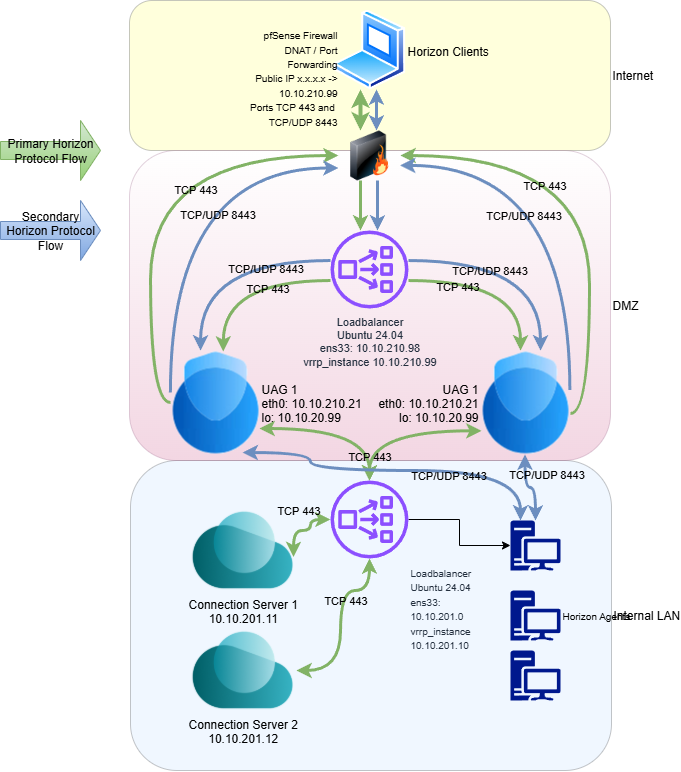
Primary Horizon Protocols (Control Plane - Green Color Flow)
(1 → 2) Client entry & DMZ hand-off. The flow begins when the user enters the Horizon hostname in the client. This starts the control protocol used for authentication, authorization, and session management — the Horizon XML-API over HTTPS (TCP 443). Your pfSense edge DNATs the public IP to the VRRP VIP in the DMZ (e.g., x.x.x.x:443 → 10.10.210.99:443).
(2 → 3) VRRP ownership of the VIP. On the Ubuntu load-balancer node, keepalived runs vrrp_instance VI_99 on ens33 with a fast advert interval (0.3s) and a short preempt delay (1s). The VIP 10.10.210.99/32 is floated between LB peers; on failure it flips to the standby in a fraction of a second. This makes the VIP highly available before any per-service balancing occurs.
(3) L4 load balancing with IPVS (DR mode). Incoming VIP traffic is classified by an fwmark (10) and handled by the IPVS virtual server:
- lb_kind DR — Direct Routing: packets are delivered to UAGs without SNAT, preserving the real client IP and maximizing throughput (kernel L4 path).
- lb_algo sh — source hashing: a given client consistently maps to the same UAG, providing natural stickiness for the control plane.
- persistence_timeout 120 — adds short-term stickiness so quick, subsequent TCP connects from the same client stay on the selected UAG.
- delay_loop 2 + TCP_CHECK on port 443 (1s timeout, 1s retry) — health probes ensure only healthy UAGs (e.g., 10.10.210.21 and 10.10.210.22) receive XML-API traffic.
(3 → 4) Connection Server note (test setup). For testing, both UAGs target a single Connection Server. A similar LB pattern for Connection Servers is possible (outside the scope here; I’ll cover it in a separate article). Because Connection Server security-gateway features are disabled, only TCP 443 is relevant on this yellow (control) path.
(Green flow separation). Once authentication succeeds, secondary protocols (Blast/PCoIP, HTTPS Tunnel) are established and the UAGs talk directly to the desktop agents. From that point on (green flow), the Connection Servers are not in the data path; only the UAG selected during the primary leg must continue to be used for the secondary connections.
Secondary Horizon Protocols (Blue Color Flow)
1) Primary picks the UAG, then Blast takes over. After the Horizon XML-API (TCP 443) authenticates the user, the client starts Blast Extreme: a small control channel over TCP 443 plus the media path over UDP 8443 (UDP is where the performance comes from). All secondary connections must hit the same UAG that handled the primary leg.
2) DR-mode LB steers inbound Blast to the right UAG. With a Direct Routing (DR) mode load balancer, only the inbound packets to the VIP are scheduled. Consistent hashing/affinity ensures the Blast TCP + UDP flows are sent to the same UAG as the XML-API leg, so UAG can authorize them against the authenticated session.
3) VIP-on-loopback + ARP suppression (what your UAG tweaks achieve). By having the VIP bound on loopback and suppressing ARP on each UAG, only the load balancer advertises the VIP to the network. The UAGs still accept traffic to the VIP but stay silent at L2. Result: no ARP fights, clean DR-mode operation, and stable steering of Blast flows.
4) Return path bypasses the LB → lower latency, higher throughput. Because it’s DR mode, the UAG sends responses directly to the client via the gateway (not back through the LB). That keeps the LB out of the data path, minimizing jitter and CPU overhead and letting UDP 8443 run at line rate—exactly what Blast needs for snappy UX.
5) Resilience during a UAG outage (the case that matters for Blast).If a UAG goes down mid-session, the load balancer’s health checks mark that node down and immediately stop scheduling new traffic to it. Any Blast session on that failed UAG will drop, and the Horizon Client will reconnect via the VIP: it re-establishes the primary XML-API (TCP 443) and then brings up Blast TCP 443 + UDP 8443 on a healthy UAG. Because we’re in DR mode, the VIP and return path don’t change, so reconnection is fast and clean. New users (and reconnecting users) are steered to the surviving UAG; no manual action is required.
Bottom line: this design gives you true UDP Blast at scale—the LB selects the right UAG on ingress, the UAG returns traffic directly, and you get low latency, high throughput, and seamless behavior across LB failover.
Implementation
Okay, enough theory let us start the implementation ;-)
Firewall
As mentioned, we start with 2 simple DNAT rules on our PfSense that forward the ports TCP 443 and 8443 TCP/UDP to our load balance IP in this case 10.10.210.99.
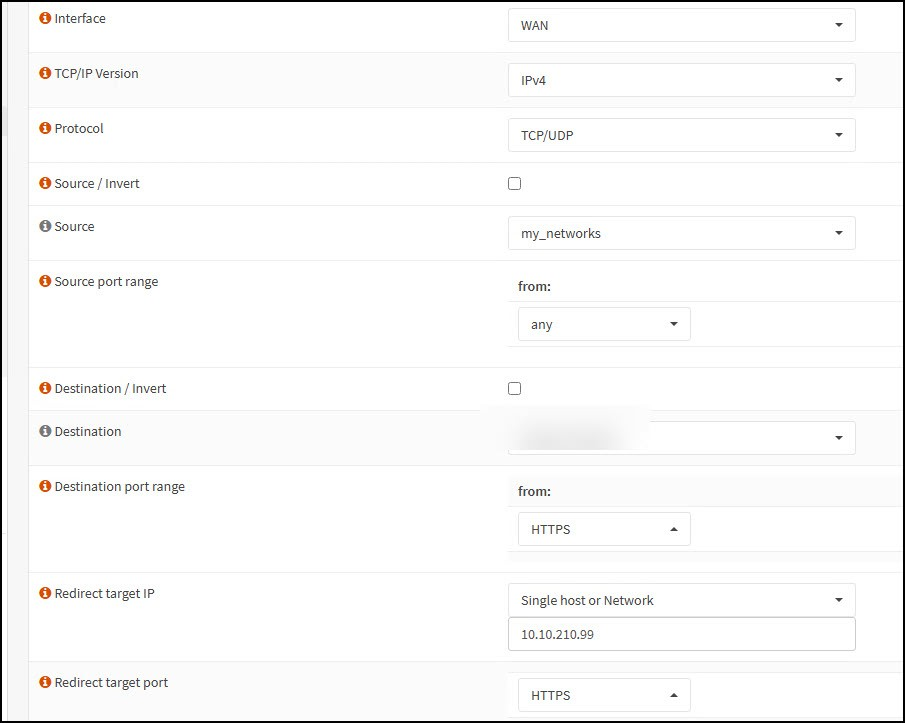
and
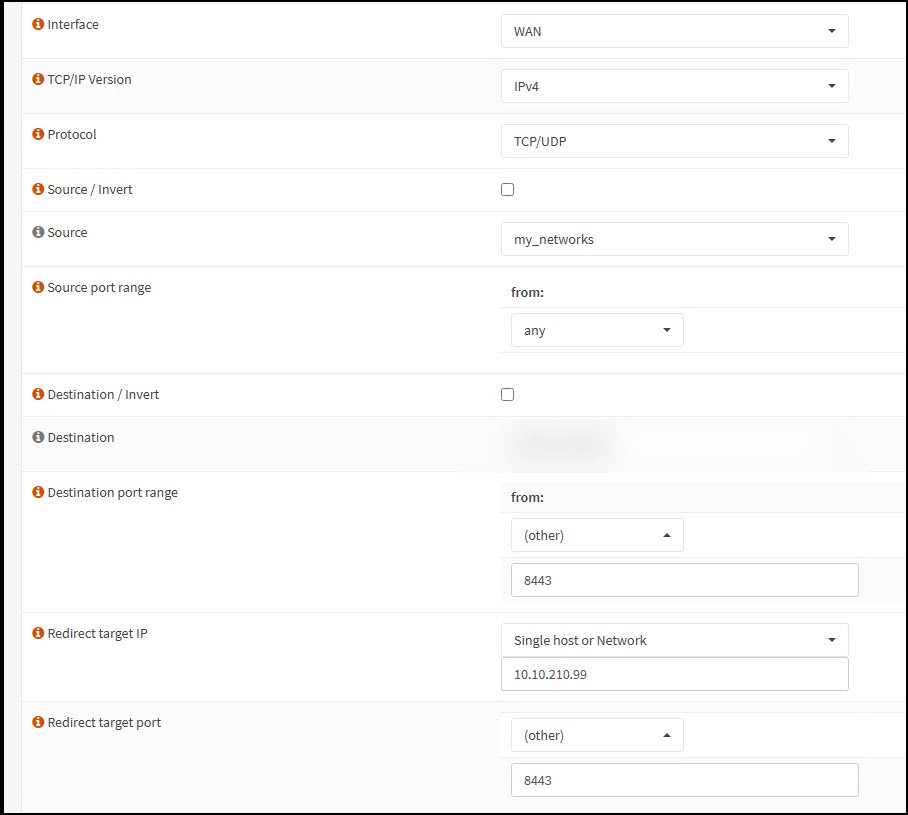
Since the Blast protocol tunnels all additional features like USB redirection, MMR, etc. by default, no additional ports need to be opened. Smart ;-)
Load Balancer Installation and Configuration
I'm using Ubuntu 20.24 LTS. I won't go into the installation details here. It's a standard server installation, except that the openssh server was also installed. The LB runs as a single instance here. In a future article, I'll explain the availability using the master/slave configuration for keepalived with an additional appliance.
Connect to the Loadbalancer Appliance via ssh:

Installation of the necessary packages:
sudo apt install -y keepalived ipvsadm iptables-persistent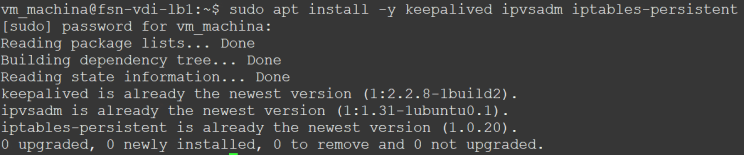
Clarify Components of the DR-Mode Load Balancer
keepalived — High Availability for the Load Balancer Itself
- Role: Provides VRRP (Virtual Router Redundancy Protocol) between two or more LB nodes.
- Why it matters: Without keepalived, your LB would be a single point of failure. With it, the LB tier is fault-tolerant.
ipvsadm (IP Virtual Server) — The Actual Load Balancing Engine
- Role: Kernel-level L4 load balancer that distributes traffic among backend UAG appliances.
- Why it matters: Unlike HAProxy, ipvsadm in DR mode can handle full-performance UDP and avoid bottlenecks, which is key for Horizon protocols.
iptables-persistent — Packet Marking & Persistence
- Role: Makes sure the correct packets are tagged (fwmark) so ipvsadm knows which flows to load balance.
- Why it matters: Without fwmark rules, ipvsadm wouldn’t know which packets to balance. And without persistence, you’d lose your firewall/NAT markings on reboot.
Mark Ports 443 and 8443 to fwmark 10
sudo iptables -t mangle -A PREROUTING -p tcp -d 10.10.210.99 --dport 443 -j MARK --set-mark 10
sudo iptables -t mangle -A PREROUTING -p tcp -d 10.10.210.99 --dport 8443 -j MARK --set-mark 10
sudo iptables -t mangle -A PREROUTING -p udp -d 10.10.210.99 --dport 8443 -j MARK --set-mark 10
sudo iptables-save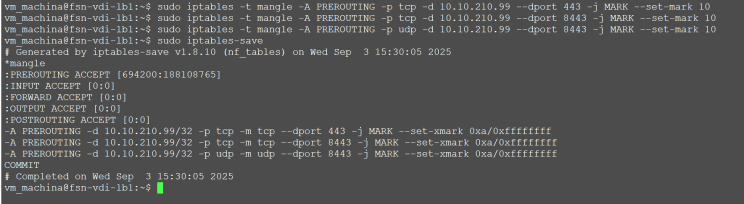
Why We Mark Ports with iptables to fwmark 10
The Linux kernel load balancer (ipvsadm) does not natively filter traffic by port and protocol in a flexible way. Instead, it relies on firewall marks (fwmarks) to know which packets should be handled by a given virtual server rule.
In this design, we use iptables in the mangle table to tag all Horizon-related traffic — TCP 443, UDP 8443 — with the same fwmark 10.
- This allows different ports and protocols (primary XML-API, Blast, PCoIP) to be treated as one logical service.
- The
virtual_server fwmark 10definition inipvsadmthen ensures that all tagged traffic from a single client is directed to the same UAG. - Without fwmark grouping, each port would need a separate load-balancing rule, and stickiness between primary and secondary Horizon protocols could easily break.
In short: marking ports with fwmark 10 lets us unify all Horizon flows into a single load-balanced service, ensuring session affinity and UDP/TCP consistency across UAGs.
Configure keepalived
vm_machina@fsn-vdi-lb1:~$ vi /etc/keepalived/keepalived.confvrrp_instance VI_99 {
state MASTER
interface ens33
virtual_router_id 99
priority 100
advert_int 0.3
preempt_delay 1
authentication {
auth_type PASS
auth_pass 12345678
}
virtual_ipaddress {
10.10.210.99/32 dev ens33
}
}
virtual_server fwmark 10 {
delay_loop 2
lb_algo sh
lb_kind DR
persistence_timeout 10
real_server 10.10.210.21 {
weight 1
TCP_CHECK {
connect_timeout 1
delay_before_retry 1
connect_port 443
}
}
real_server 10.10.210.22 {
weight 1
TCP_CHECK {
connect_timeout 1
delay_before_retry 1
connect_port 443
}
}
}UPDATE 11.09.2025: updated persistence_timeout from 120 to persistence_timeout 10 for faster failovers
Here are the respective explanations what we configured:
vrrp_instance VI_99 — High-Availability VIP Handling
- state MASTER / priority 100: Defines the active node. The peer runs in BACKUP state with lower priority; if MASTER fails, BACKUP takes over.
- interface ens33: VRRP packets are advertised over the DMZ NIC. This ensures the VIP (10.10.210.99) is always owned by one node on that network.
- virtual_router_id 99: A unique ID to prevent clashes with other VRRP groups on the same segment.
- advert_int 0.3: Very fast advertisement interval (300 ms). This reduces failover detection time significantly (compared to the default of 1 second).
- preempt_delay 1: If the MASTER comes back after a failure, it waits one second before preempting the BACKUP. This avoids flapping in unstable conditions.
- Authentication block: Lightweight password-based VRRP authentication ensures only legitimate cluster members can participate in VIP ownership. (Please use a secure Password ;-)
- virtual_ipaddress { 10.10.210.99/32 dev ens33 }: The VIP is bound as a /32 on the DMZ interface, not advertised on loopback. This allows clean hand-off between nodes while UAGs themselves hold the VIP on loopback (with ARP suppression).
virtual_server fwmark 10 — The Load-Balancing Logic
- fwmark 10: Instead of binding to a single IP/port, the LB uses iptables marks. All Horizon traffic (TCP 443, UDP 8443, TCP/UDP 4172) is tagged with mark 10. This lets you group all Horizon protocols into a single load-balanced service — critical for session stickiness.
- delay_loop 2: Health checks run every 2 seconds; a good compromise between fast failure detection and not overloading UAGs with probes.
- lb_algo sh (Source Hashing): Clients are consistently mapped to the same UAG based on source IP. This guarantees that the primary XML-API and secondary Blast/PCoIP flows stay on the same UAG, even when multiple ports are involved.
- lb_kind DR (Direct Routing): The LB only handles inbound scheduling. Replies go directly from the UAGs to clients via their default gateway. This preserves client IPs, minimizes latency, and ensures UDP throughput at line rate.
- persistence_timeout 120: Provides a short “stickiness buffer” (2 minutes). If a client reconnects quickly (e.g., after network blip), they are sent back to the same UAG. This reduces session churn without forcing long-term persistence.
real_server Blocks — Backend UAG Health & Balancing
- real_server 10.10.210.21 / .22: The backend UAG appliances. Each is treated equally with weight 1.
- TCP_CHECK on port 443: Probes the UAG’s HTTPS listener (XML-API). This is a reliable health indicator — if the control plane is down, the UAG won’t be selected ;-)
Configure the UAG`s (GUI Part)
Connect to the Admin Interface to both Uags in my Case 10.10.210.21 and 10.10.210.22
Prepare the Horizon Edge Services
First, we need to clarify the conditions within the GUI for the UAGs. The special thing is that we enter the in the blast external URL and tunnel external URL the load balancer hostname in both UAGs (in my case, connect.wspace.one). As you can se on both UAGs i addded the Internal Network Loadbalancer for both Connection Servers.
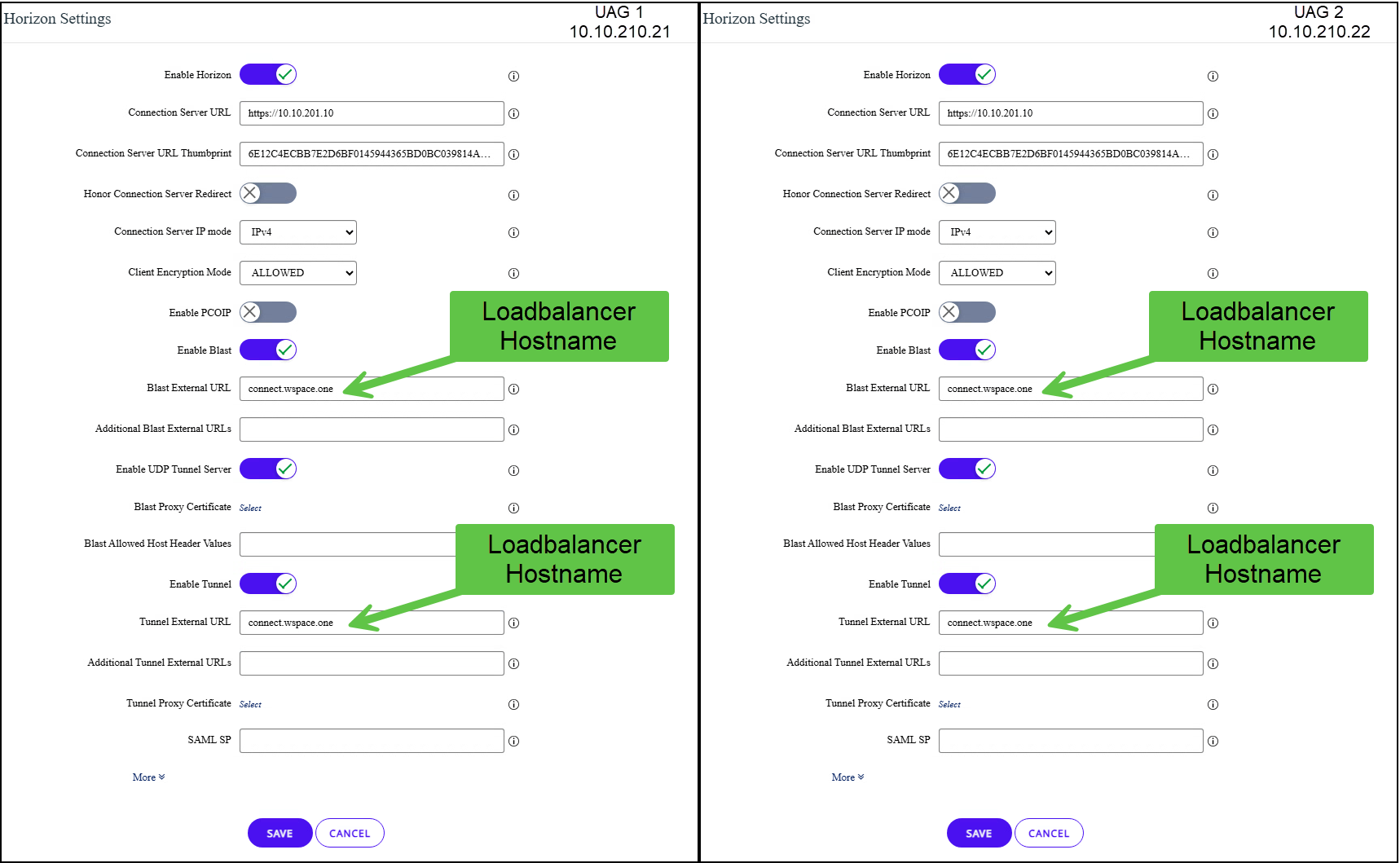
Otherwise, no other settings have been changed from the standard on the horizon edge services. About the allowed Allowd Origins Feature.These were introduced to strengthen the protection against attacks related to Cross-Origin Resource Sharing (CORS). The HTTP header Origin (if present in a HTTP request) is validated by default against an allowed list of permitted origins in the Horizon Settings.
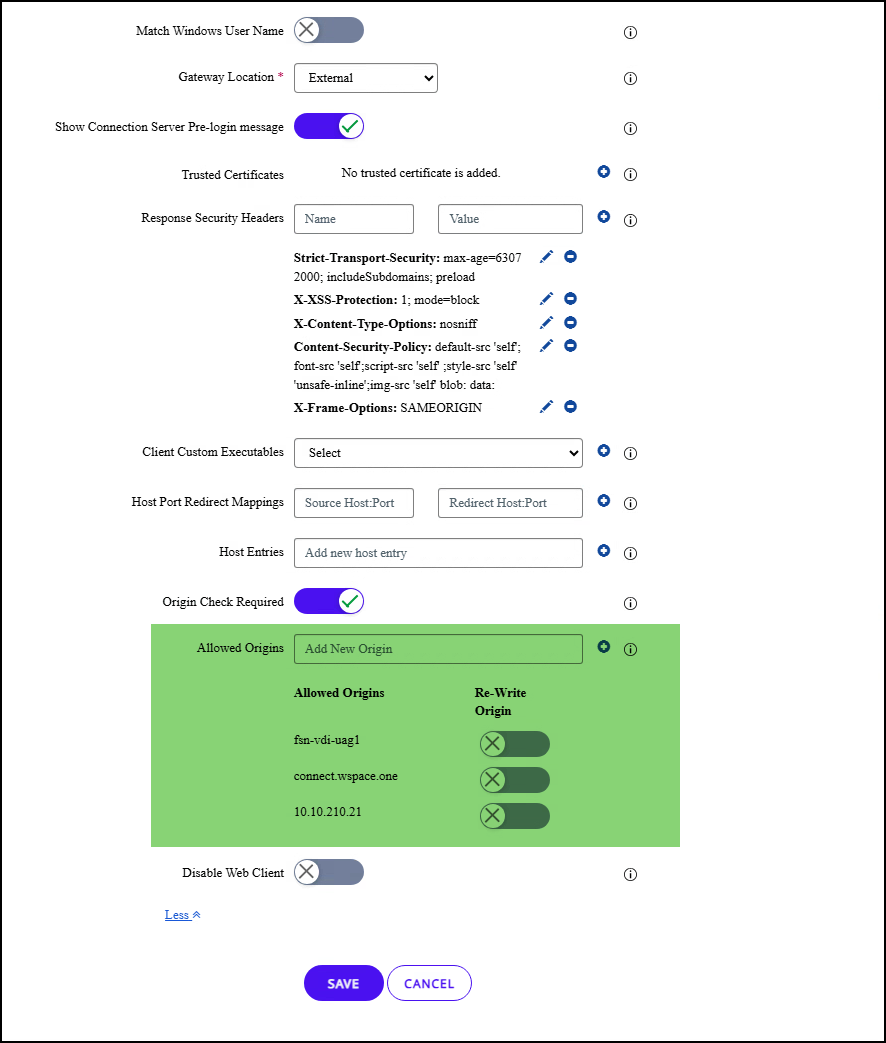
There has been a lot of confusion since the introduction. I recommend everyone to read the excellent documentation on the subject at Omnissa.
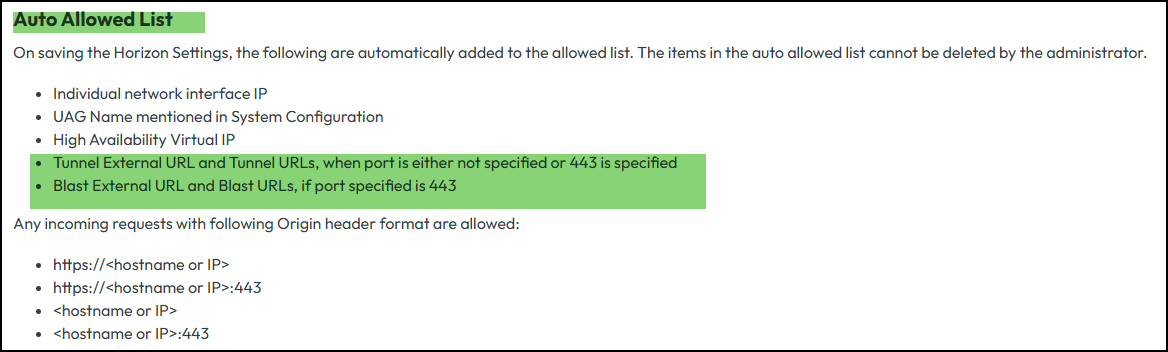
more info on the topic here:
Mandatory Validation of Origin HTTP Header (Omnissa Docs)No further settings needed anymore also no change to the new Allowed Host Header function are required under System Configuration -> Allowed Host Headers. As you can see connect.wspace.one was added automatically:
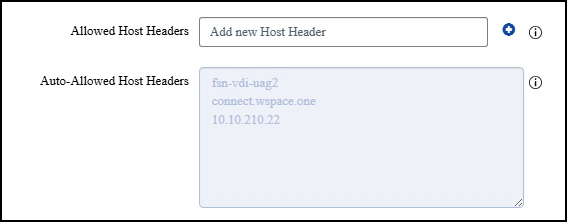
More Infos reagrding Allowed Host Headers here:
UAG System configuration (Omnissa Docs)That's it for the GUI side. Not so difficult, is it? Not unusual for most people ;-) As mentioned and described in detail above, we now need to complete the non-GUI part, or rather, the part that the UAG needs to use to use the direct routing feature that allows the UAG itself to access the packets that are originally terminated on the load balancer IP—in my case, 10.10.210.99. On to the last section.
Configure the UAG`s (Non-GUI Part)
We need the following settings on both UAGs to enable direct routing mode. I use /etc/rc.local to ensure the values survive a reboot. Lately it is not so easy to enable ssh by default after powrshell deployment on the uag. For all affected users, I have written an elegant powercli script that automatically grants root access and starts the ssh service.
You can Download it here:
 vmmachina
After we connected via ssh we start openening the /etc/rc.local file
vi /etc/rc.localNow we add the folllwoing Content to the file. Please remember to add your Loadbalancer IP for the lo Interface. In my Example it is 10.10.210.99
ip addr add 10.10.210.99/32 dev lo
echo 1 > /proc/sys/net/ipv4/conf/lo/arp_ignore
echo 2 > /proc/sys/net/ipv4/conf/lo/arp_announce
echo 1 > /proc/sys/net/ipv4/conf/all/arp_ignore
echo 2 > /proc/sys/net/ipv4/conf/all/arp_announce
My file looks like this now:
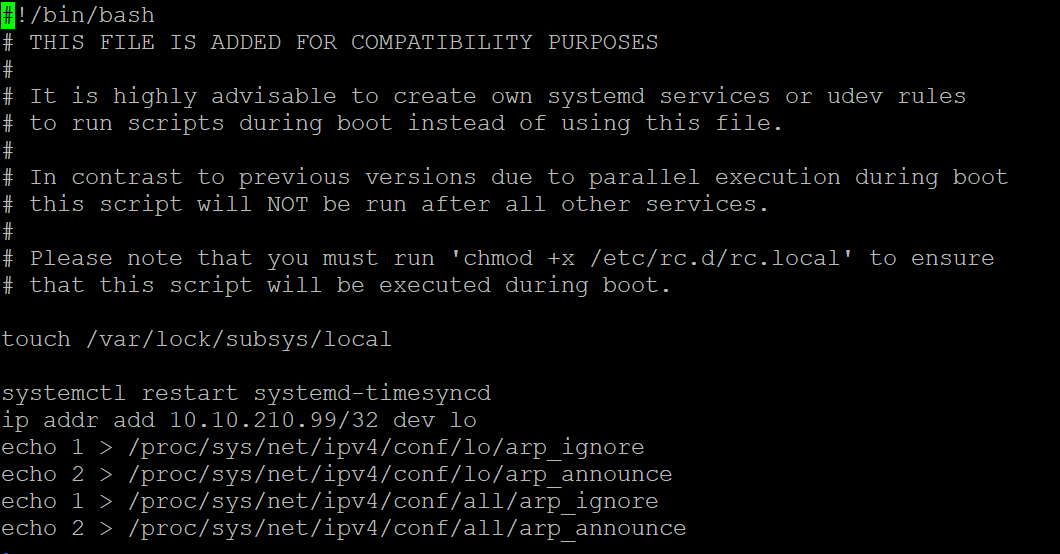
Adding this allows us to execute the commands directly even after a reboot. If you don't want to run a reboot now , you can run the commands directly in bash one time.
What do these settings do?
In Direct Routing (DR) mode, the load balancer (LB) accepts incoming packets for the Virtual IP (VIP) and forwards them to the selected backend (in this case, the UAGs). To make this work reliably, the VIP must also exist on the backend servers — otherwise, they would drop the packets addressed to it.
That’s why we add the VIP as a /32 address on the loopback interface of each UAG:
ip addr add 10.10.210.99/32 dev loHowever, if we stopped here, each UAG would also respond to ARP requests for the VIP. This would cause the classic ARP problem in LVS/DR setups: multiple machines (LB and UAGs) claiming ownership of the same IP, leading to unstable or broken traffic flows.
To prevent this, we enable ARP suppression on the loopback and globally:
echo 1 > /proc/sys/net/ipv4/conf/lo/arp_ignore
echo 2 > /proc/sys/net/ipv4/conf/lo/arp_announce
echo 1 > /proc/sys/net/ipv4/conf/all/arp_ignore
echo 2 > /proc/sys/net/ipv4/conf/all/arp_announce
What Really Happens in DR Mode
- Who answers ARP for the VIP?
- Only the load balancer (via keepalived/VRRP) responds to ARP requests for the VIP on the DMZ subnet.
- The UAGs have the VIP bound on
lowith/32and ARP suppression, so they do not answer ARP for the VIP on their external NIC.
- How the UAG sees packets forwarded by the LB:
- The LB forwards packets for the VIP to the chosen UAG’s MAC address (but with the VIP as the destination IP).
- Because the VIP is configured on loopback, the UAG kernel accepts the packet as local traffic.
- How replies leave the UAG:
- The UAG builds a response packet with the VIP as the source IP.
- The reply is routed using the UAG’s normal routing table:
- Destination = client’s public IP
- Next-hop = default gateway (e.g., pfSense in your setup)
- ARP is resolved for the gateway’s IP, not for the LB.
- So the UAG never sends replies back to the load balancer.
- Resulting path:
- Ingress: Client → Public IP → pfSense → LB (VIP) → UAG
- Egress: UAG → Default Gateway → Client
- The LB is only in the ingress path, never in the return path.
For many Horizon admins, the manual tweaks required inside each UAG to enable Direct Routing mode (adding the VIP on loopback, suppressing ARP, and persisting the settings) are error-prone and frankly a bit tedious. Every time you redeploy or update a UAG, those settings are wiped, and you’re left repeating the same low-level commands by hand.
To solve this, I wrote a PowerCLI automation script that applies the full configuration for you:
- Connects to vCenter and locates the UAG VM
- Injects the required commands (
ip addr add,arp_ignore,arp_announce) directly inside the appliance - Updates
/etc/rc.localso the changes survive reboots - Runs in just a few seconds against each UAG
Download it here:
 vmmachina
This way, instead of SSHing into every UAG and typing obscure sysctl commands, you can run the script once per VM and be sure the configuration is applied consistently and made persistent.
For environments where manual intervention on UAGs is too time-consuming or risky, this is a simple, repeatable, and elegant solution.
Here a short Video showing the Failover Solution described for a Horizon Client Connection inclusive UDP Resume. Enjoy:
Conclusion
Ensuring high availability and performance for Omnissa Unified Access Gateways in Horizon environments has always been a balancing act between cost, complexity, and protocol coverage. Native UAG HA provides only a partial solution, while open-source tools like HAProxy fall short on UDP support. Enterprise-grade load balancers solve the problem comprehensively but are often financially out of reach for small and mid-sized organizations.
The approach demonstrated in this article closes that gap: a low-cost, full-featured, and high-performance load balancer built on standard Linux components (keepalived, ipvsadm, and iptables-persistent). By running in Direct Routing (DR) mode, it delivers:
- Reliable primary XML-API handling with stickiness and health checks
- Full UDP tunneling support for Blast Extreme and PCoIP, including resilience across UAG outages
- Minimal latency and overhead, since return traffic bypasses the load balancer
- Extremely fast failover times using VRRP
- The ability to operate with a single public IP address
Yes, DR mode requires small but unsupported tweaks inside the UAGs. But with automation via PowerCLI, even this becomes a consistent, repeatable process that survives redeployments.
The result is a robust and cost-efficient alternative to commercial load balancers — one that unlocks the full performance of Horizon, scales with your environment, and stays within reach for organizations that cannot justify enterprise appliance pricing.
In short: with the right design and a few lines of Linux configuration, you can build a load balancer that is fast, resilient, and Horizon-aware — without breaking the budget.
About me...
This was my very first blog post after many years of delivering EUC and datacenter projects. I finally decided it’s time to share some of my experience more openly with the community — and I truly hope you found this article helpful.
A quick word about me: My name is Stefan Gourguis, I’m 46 years old, and I work in this field for Sonio AG in Zurich. Over the years, I’ve had the chance to deliver numerous projects in this space, and in the past I also worked as a PSO for VMware and Omnissa.
The site itself is still a work in progress, but there will be much more to come on VMware datacenter and Omnissa EUC topics. For now, I’ve kept the focus on practical technical content that anyone can put to use right away.
I’d really value your feedback — both on this article specifically and on the blog in general. Did you find it useful? Was it clear, and did it address the kind of challenges you’re facing in your environment? Your input will help me shape future content to be even more relevant and valuable.
If you have questions, comments, or suggestions, feel free to reach out. You can connect with me on LinkedIn, the Omnissa community forums, by email, or even by phone. I’m genuinely interested in hearing your thoughts and discussing solutions together.
Thanks for reading — and I’d be especially happy to know how this article landed with you, whether it helped you, and what you’d like to see more of in future posts.
Cheers, Stefan

LinkedIn: https://www.linkedin.com/in/stefan-gourguis-1ab6a570/
Omnissa Forums: https://community.omnissa.com/profile/30467-stefaneuc/
Email: stg78@outlook.de