Omnissa Horizon SAML Federation: Finally a Truly Shared Identity with "Option 3"

If you have ever configured SAML authentication for a load-balanced Horizon Connection Server cluster, you know the pain. For years, every Connection Server insisted on being a unique snowflake—each generating its own local SAML metadata, its own signing certificate, and its own distinct identity.
This architectural quirk made configuring Identity Providers (IDPs) like UAG, Workspace ONE Access, Okta, or generic SAML setups a headache. It forced us into strict session affinity (stickiness) on Load Balancers during the auth phase and often broke UAG federations when a user bounced between nodes.
But with the feature "Enabling Common Service Provider Metadata," specifically utilizing Configuration Option 3, Omnissa Horizon Version 2512 has finally solved this.
The Real Problem: The "Unique ID" Mismatch
Previously, the biggest hurdle wasn't just encryption—it was identity. Even behind a Load Balancer, every single Connection Server insisted on identifying itself with its own local Fully Qualified Domain Name (FQDN) in the SAML metadata.
- Node A claimed its Entity ID was
https://node-a.local/SAML/metadata/sp.xml - Node B claimed its Entity ID was
https://node-b.local/SAML/metadata/sp.xml
This created a massive conflict for the Identity Provider (IDP). When a user started an authentication request on Node A, the IDP issued a token specifically for "Node A".
If the Load Balancer then routed the returning traffic to Node B, the authentication failed immediately. Why? Because Node B looked at the token, saw it was issued for "Node A", and rejected it. Node B effectively said: "This token isn't for me. My ID is Node B, but this ticket is for Node A."
This forced admins to configure sticky sessions (persistence) on the Load Balancer to ensure the user always landed back on the exact same server that started the request—a fragile workaround.
Enter the Solution: Configuration Option 3
This is where Configuration Option 3 changes the game. It doesn't just sync certificates; it fundamentally changes the identity of the servers.
By implementing Option 3, you force every Connection Server to stop using its local hostname as its ID. Instead, they all agree to present the same global Entity ID—typically the FQDN of your Load Balancer (e.g., https://horizon.company.com/SAML/metadata/sp.xml).
How to Implement It (The "Option 3" Fix)
Enabling this feature doesn't require a reinstall or complex command-line tools. It is done via a simple attribute change in the Horizon LDAP configuration (ADSI Edit).
Here is the step-by-step implementation guide:
1. Connect to the Horizon LDAP
- Log in to one of your Connection Servers.
- Open ADSI Edit (
adsiedit.msc). - Right-click on "ADSI Edit" and select Connect to...
- Connection Settings:
- Name: Horizon LDAP (or any name you prefer)
- Connection Point: Select "Select or type a Distinguished Name or Naming Context" and enter:
dc=vdi,dc=horizon,dc=internal - Computer: Select "Select or type a domain or server" and enter:
localhost:389
2. Navigate to the Configuration Once connected, expand the tree in the left pane:
- Expand
DC=vdi,DC=horizon,DC=internal - Expand
OU=Properties - Select
OU=Global
3. Modify the Global Properties
- In the right pane, locate and double-click on CN=Common.
- In the properties window, look for the attribute named
pae-SAMLKeySharingEnabled. - Double-click the attribute to edit it.
4. Apply Option 3
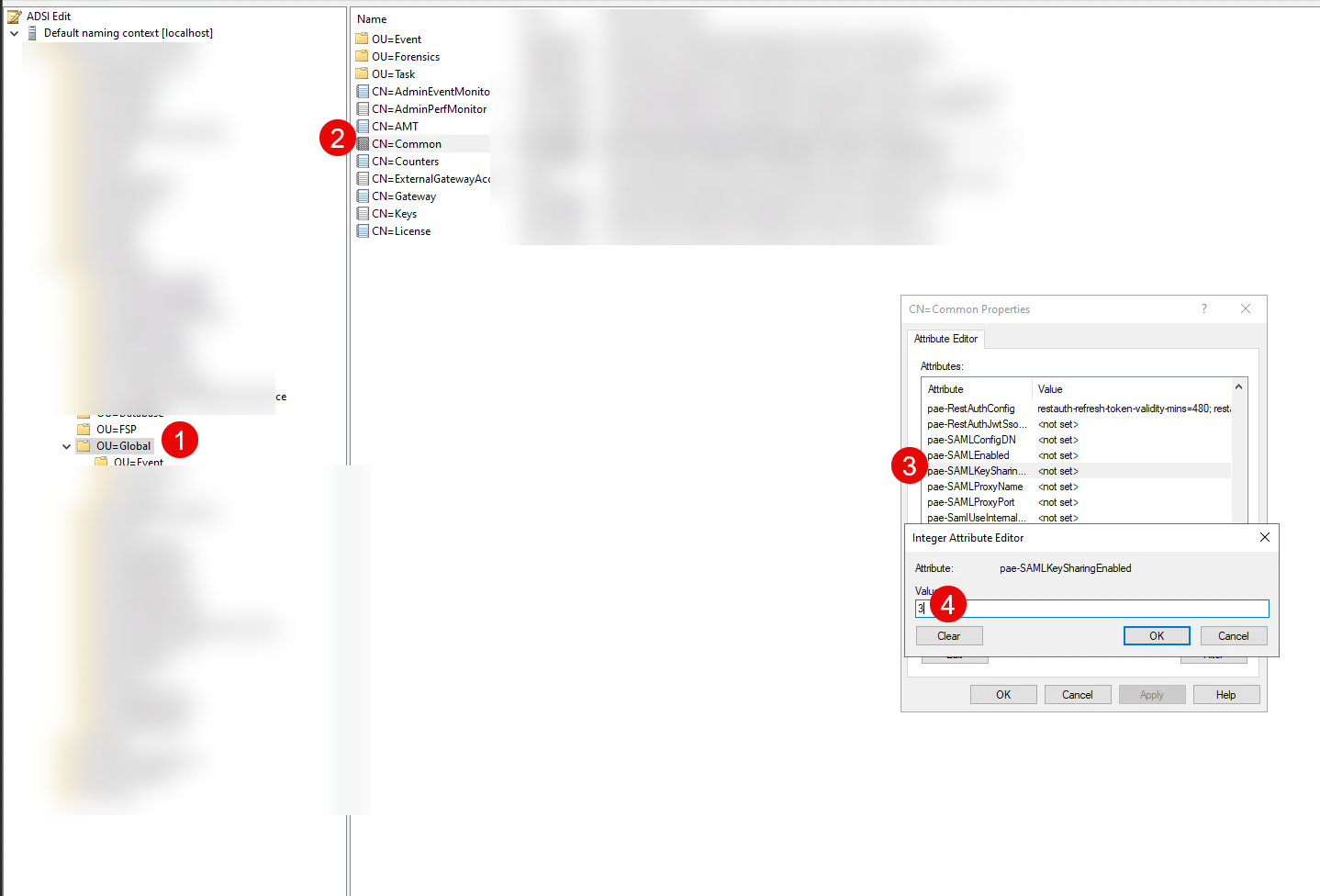
- In the "Value" field, type the following string exactly:
cs-saml-encryption-key-mode=3 - Click Add.
- Click OK to close the attribute editor, and OK again to close the properties window.
That’s it. The configuration will replicate to all other Connection Servers in the pod. Your cluster is now operating with a single, shared Entity ID. You can now configure your Identity Provider (Okta, Entra ID, etc.) with the single Metadata URL from your Load Balancer, and it will work seamlessly across all nodes.
How "Option 3" Fixes the Flow
With Option 3, the "Split Brain" is gone.
- Unified Identity: Every node in the cluster now tells the IDP: "My Entity ID is
https://horizon.company.com." - Stateless Authentication:
- User hits Node A. Node A requests a token for the Shared Entity ID.
- IDP issues a token for
https://horizon.company.com. - Load Balancer sends the return traffic to Node B.
- Success: Node B looks at the token, sees it is for
https://horizon.company.com, and accepts it because that is now its own ID too.
You no longer need session affinity for the SAML flow. The cluster finally acts as one single logical unit.